A Long Flight codes right now
Checked against the official Roblox game page 2026-10-25 00:00 UTC
- 1MVISITS 100 tokens
A Long Flight is a Roblox survival game by VSC Games. You're stuck in a desert with an old plane, and your job is to get it flying. Codes give you free tokens, which you spend on better planes in the Shop. The live table at the top of this page lists every active, new and expired code with its reward, so start there. This guide shows you how to redeem a code and what to do if one doesn't work.
How to redeem codes in A Long Flight
You enter codes from the main screen, called the HUD. You don't need to start a flight first.
-
Join the game. A Join VSC Games popup covers the screen. Click Not Now to close it.
-
Look at the left side of the screen. Click the CODES button just above your token counter.
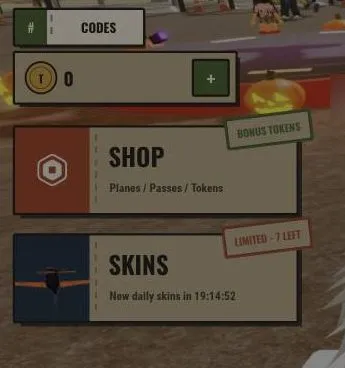
- Click the ENTER CODE box and type in a code from the table above.
- Click the red REDEEM button.
- Look for a popup that says what you got, such as Redeemed: 100 Tokens. Your token counter should go up by the same amount.
- Close the popup with its X button.
What codes give in A Long Flight
So far, codes in this game give tokens. One code we checked gave 100 Tokens.
Tokens are the main currency. You spend them in the Shop's Plane tab. Everyone starts with the free plane Old Rusty. Better planes cost tokens:
- Tumbleweed: about 290 tokens
- Dust Comet: about 300 tokens
- Grasshopper: about 300 tokens
The plane you buy becomes the one you start every run with. You can also find other planes during a run, so you don't need to buy one straight away. Saving your code tokens until you can afford one is a good plan.
The Shop also has a Tokens tab with bundles that cost Robux, plus Robux gamepasses that let you spawn with some planes. You don't need any of these to use codes.
Where to find new codes
- This page. New codes show up in the live table above as soon as we spot them.
A Long Flight is an Early Access game, so updates may arrive often. Check back now and then so you don't miss a new code.
Why a code might not work
If a code doesn't work, check these things:
- Typing mistakes. Type the code exactly as it appears in the table, with the same letters and numbers. Don't add any spaces.
- The code has expired. Old codes stop working. Expired codes are marked in the table above.
- The wrong button. Use the CODES button inside the game.
Frequently asked questions
What are the working A Long Flight codes?
The live table at the top of this page lists every active code and its reward.
Where do you enter codes in A Long Flight?
Click the CODES button on the left of the screen, just above your token counter. Type the code in the ENTER CODE box and click the red REDEEM button.
What do A Long Flight codes give?
Codes give tokens. One code we checked gave 100 Tokens, which you can save up to buy better planes in the Shop.
What can I buy with tokens in A Long Flight?
You can buy planes in the Shop's Plane tab. Tumbleweed costs about 290 tokens, and Dust Comet and Grasshopper cost about 300 tokens each.
Why is my A Long Flight code not working?
It may be expired or typed wrong. Copy it exactly as shown in the table, with no extra spaces.
How we checked this guide
We played A Long Flight on a fresh account (last checked in-game 25 Oct 2026) and every screenshot here comes from that play. Each fact in this guide was checked against our gameplay notes and the official Roblox game data, and 7 claims we couldn't confirm were corrected or removed before publishing. Player names and chat are blurred. More on how we check our guides.
Add MMORocks as a preferred source on Google to see our guides first in Top Stories.