My Chiikawa Restaurant! is a Roblox restaurant game where you place tables, seat hungry guests and cook their orders to earn cash. A few small mistakes on your first day can leave guests stuck in line or your pantry empty. This guide takes you from the loading screen to the end of Day 1. It covers every step and the traps new players fall into most.
Where everything is on screen
Learn the screen first. It makes the rest of the day much easier.
- Cash is at the bottom left, shown with a $ sign. You start with about $1647.
- Shop and My Restaurant buttons are at the top centre.
- Restaurant, Recipes and Workers buttons are down the left side.
- The phone is on the right edge, under the Favours panel. Its apps are Pets, My Pets, Momomart, Camera, Rewards, Index, Favours, Perf Mode, Codes and GPS.
- DAY 1 shows at the top, so you always know which day it is.
Money Shop items cost Robux, like the Chiikawa Midnight Manor theme for 699 Robux. You don't need any of it to play well. If it opens, close it with the X.
Get past the loading screen and popups
A few popups appear before you can play. They block the game until you close them.
- On the 'Opening your little eatery' loading screen, click Skip » at the top right.
- When Daily presents opens, click Keep cooking.
- On the Komorebi Village is open! notice, click Yay!
- Check that the Favours panel now shows on the right.
Your Day 1 present is $500 cash. To collect it, open the phone, tap REWARDS, then click Collect on the day card that says Ready.
Tutorial: place your first table and chairs
The pink tutorial banner and the white floor arrows always show your next step. The button you need glows.
- Follow the white floor arrows to the glowing green slot.
- Stand on the slot and press E to open Customize.
- On the Tables tab, click Place table on the Cozy table. This first one is free.
- Click the Chairs tab.
- Click Place chair pair on the Mini chair.
- Click Done.
Don't skip the chairs. Guests can only sit at tables that have chairs.
Seat your guests at the host podium
Guests queue up and wait for you to seat them. Don't leave them standing in line.
- Walk to the host podium (the register by the kitchen counter).
- Use the Assign seats prompt.
- Click Seat next guest once for each free seat, until Available reaches 0.
- Close the Guest seating panel with the X.
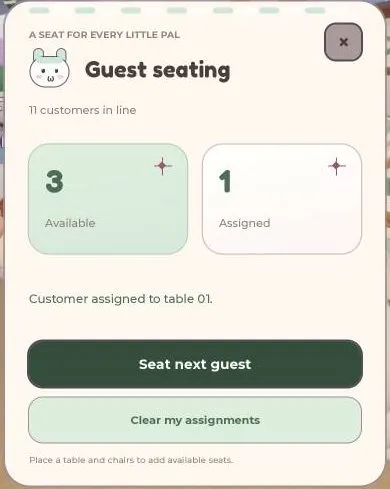
Watch the Available counter. Clicking more times than there are free seats does nothing. If Available is 0 and people are still waiting, you need more tables and chairs.
Place the stove and cook orders
When the banner says Place down the stove!, it's time to set up the kitchen.
- Open Customize and go to the Stoves tab.
- Click Place stove on the Cream stove card.
- Walk to the stove and use the Make Order prompt.
- Wait for the Making (dish)... bar to finish.
Once a dish is served, the happy customer pays you cash. The Cream stove is also listed for sale at Second Chance.
Buy cheap furniture from Maple
More tables mean more guests at once. There are two furniture shops. Kurimanju's Cozy Corner is pricey, so new players should shop at Maple's Second Chance instead. It sells used furniture for much less.
- Walk to Maple and use Talk to Maple, then click Buy.
- On the Furniture tab, click Buy 1 on the Cozy table ($30).
- Click Buy pair for $25 on the Mint chair. Buy one pair for each table.
- Close the shop with the X. Your furniture is now in your bag.
Stock is limited. An item can sell out after one buy, then it restocks later. Your first furniture buy also completes a Favour worth +$100.
Place furniture from your bag
Furniture you buy doesn't appear by itself. You place it from your bag.
- Stand right on a green numbered slot (for example, 05).
- Press E to open Customize.
- On the Tables tab, click Place table.
- On the Chairs tab, click Place chair pair.
- Click Done, then walk to the next green slot and repeat until your bag is empty.
If it says No tables in your bag (or no chairs), go back to Maple and buy more. Always stand on a green slot before you open Customize.
Order ingredients early
Delivery takes about 3 minutes, so order before you run out. Use the wait to buy and place furniture.
- Talk to Momo at the Momomart counter and click Buy.
- Scroll to the recipe sections, such as Gyoza (Dumpling wrappers + Ground pork).
- Set quantities with +/- and click Add to basket on each ingredient. The minimum is 20 of each.
- Check that the Basket total is no more than your cash, then click Order delivery.
- When the timer ends, go to the delivery truck on the street and click Sign.
- Wait for the Pantry stocked notice.
The ingredients aren't yours until you sign for them. Some items, like Strawberries, are often out of stock and can't be added. For more detail, see How to Order Ingredients in My Chiikawa Restaurant Roblox.
Do the easy Favours for extra cash
The Favours panel on the right lists small jobs that pay well on your first day:
- Buy your first furniture: +$100
- Hire your first worker: +$200 (a worker's fee is around $125)
- Talk to a street pal: +$100
- Finish Day 1: +$200
For the street pal, walk to Kiki (red mushroom hat) by the pink trees on the street. Press Talk, click Need any help?, then pick I'll help! or Maybe later.
To hire your first worker, meet a helper at the tent camp. How to Hire Workers in My Chiikawa Restaurant (Roblox) explains how to choose a good one.
Finish Day 1
When the day ends, a Day 1 done! summary appears.
- Read Money earned and Dishes served to see how you did.
- Click Lovely! to carry on.
This also completes the Finish Day 1 Favour for +$200.
Traps new players fall into
- Seating guests before placing chairs. No chairs means no seat.
- Leaving popups open. Daily presents and event notices block the game until you close them.
- Ignoring the queue. Don't leave guests standing in line. Seat them at the podium, or hire a Host.
- Forgetting to sign. Delivered ingredients aren't stocked until you click Sign at the truck.
- Ordering more than you can pay for. Keep the Basket total at or under your cash, and remember the minimum of 20 per ingredient.
- Opening Customize off a slot. Stand on a green numbered slot first.
- Clicking Robux offers. The Money Shop is optional. Close it with the X.
Want more cash after Day 1? Try How to Make Money Fast in My Chiikawa Restaurant (Roblox), and check Roblox My Chiikawa Restaurant! Codes (October 2026) for free rewards.
Frequently asked questions
Why won't my guests sit down in My Chiikawa Restaurant?
Guests can only sit at tables that have chairs. Place a chair pair at every table, then use Assign seats at the host podium and click Seat next guest.
Where do I buy cheap tables and chairs?
Go to Maple's Second Chance shop. A Cozy table costs $30 and a Mint chair pair costs $25. Stock sells out after one buy and restocks later.
How long does ingredient delivery take?
About 3 minutes. When the timer ends, go to the delivery truck on the street and click Sign, or your pantry won't be stocked.
Why does Customize say there's nothing in my bag?
You've placed everything you bought. Buy more furniture from Second Chance, then stand on a green numbered slot and open Customize again.
How do I close the popups when I join?
Click Skip » on the loading screen, Keep cooking on Daily presents, and Yay! on the Komorebi Village notice.
What are the easiest Favours on Day 1?
Buy your first furniture (+$100), hire your first worker (+$200), talk to a street pal (+$100) and finish Day 1 (+$200).
Second Chance Furniture
| Name | Price |
|---|---|
| Cozy table | $30 each |
| Mint chair | $25 per pair |
How we checked this guide
We played My Chiikawa Restaurant! on a fresh account (last checked in-game 25 Oct 2026) and every screenshot here comes from that play. Each fact in this guide was checked against our gameplay notes and the official Roblox game data, and 9 claims we couldn't confirm were corrected or removed before publishing. Player names and chat are blurred. More on how we check our guides.
Add MMORocks as a preferred source on Google to see our guides first in Top Stories.