In Infinite Tower Tycoon, your tower makes money, but your bat makes money too. Early on, you can earn extra cash on top of your droppers by hitting zombies, other players' clones and crates. This guide walks you through a first session in order: claim a plot, collect your cash, fight with the bat, open crates, spin the free wheel, make your first clone upgrades and ride the elevator. Along the way you'll learn how to avoid wasting cash, and how to avoid spending Robux by accident.
Step 1: Claim a plot
When you join, look for an empty plot with an Unclaimed sign over it.
- Walk to a plot that says Unclaimed.
- Claim it.
- Check the sign. Your own plot now shows your name and level instead of "Unclaimed".
If the sign still says Unclaimed, it isn't yours yet. Your tycoon progress saves on its own, so you can come back to it later.
Step 2: Stop accidental Robux buys
Some pads and buttons in this game cost Robux. Before you start running around, change one setting so a stray click can't buy something.
- Click the gear icon at the bottom of the left sidebar.
- Scroll down to the Visual section.
- Click the Robux button mode toggle once so it reads Prompt.
- Close Settings with the red X.
Now a Robux item asks you to confirm before anything is bought. Robux passes such as Auto collect (350 Robux), 2× Cash (500 Robux) and Fast elevator (120 Robux) are optional. You don't need them to play. The Game Passes guide on this site covers them if you want to know more.
Step 3: Collect cash from the green pad
Your droppers don't add cash to your total straight away. It builds up on the cash collector until you pick it up.
- Find the Cash sign in your tycoon.
- Walk onto the green pad under it. Clicking it does nothing, so you have to step on it.
- Check that your Cash counter at the top centre of the screen goes up.
Cash keeps building on the board while you're in menus or out fighting. Pop back and step on the pad often.
Step 4: Farm Wooden zombie 1 with the bat
This is a reliable source of early cash. Wooden zombie 1 has 50 HP and pays $560 per kill.
- Press 1 to equip the bat from hotbar slot 1.
- Walk right up to Wooden zombie 1. It stands beside the road or next to your tower.
- Face it and click about every 0.2 seconds. Each hit does about 10 damage, so a kill takes about 5 hits.
- Don't stop clicking. If you pause, its HP goes back up.
- Look for You killed Wooden zombie 1 +$560 in the feed.
- It respawns right away. Keep going to fill the kill bonus: Reward for 2 kills pays +$5K.
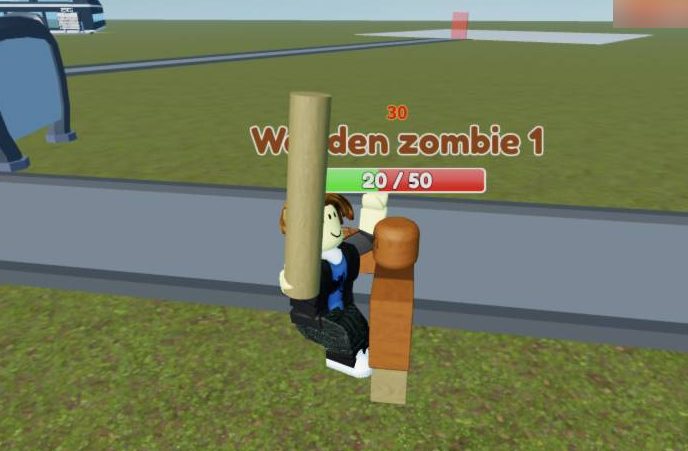
If the bat swings but the health bar doesn't move, you're too far away or you don't have the bat out. Press 1 and step closer. Zombies move around, so turn your camera to keep them in front of you. Look out for A wooden zombie is coming under the leaderboard.
Step 5: Hit other players' clones
Other players' bases spawn clones that walk around the open field. You can fight them for cash too.
- Press 1 to equip the bat.
- Run to an NPC tagged '
's clone' . Its health bar shows x/50. - Stay close and keep your camera on it, because it moves around.
- Click fast until it hits 0/50. You get about +$570, and it counts towards your kill bonus.
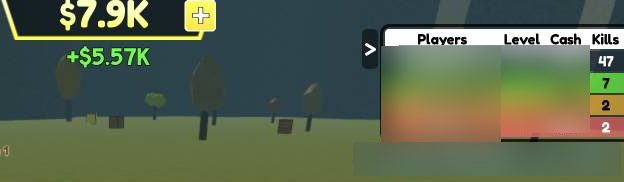
If its health gets stuck, move closer and turn to face it.
Step 6: Open crates on the grass
Crates appear on the grass near the towers. They're free cash, so open every one you pass.
- Walk next to a crate. You can keep the bat equipped.
- Click it.
- Look for You found a ... crate: +$X in the feed.
Crate payouts:
- Wooden crate: about $50–120
- Fall crate: $490
- Stone crate: $540
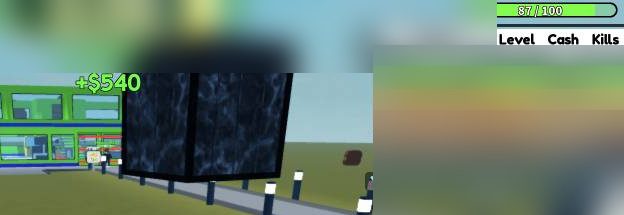
Some daily quests ask you to open crates, so this helps there too.
Step 7: Spin the free wheel
The wheel is free and can give a big boost early on.
- Click the top icon on the left sidebar.
- Click the green Spin! 1 left button in the centre.
- Wait for the wheel to stop.

Prizes are $8K, $24K or $80K, or a key. You can spin again after about 3.5 hours, so spin whenever it's ready.
Step 8: Make your first clone upgrades
Your clone fights for you, so a few cheap upgrades are worth buying early.
- Walk onto the cyan Clone machine pad and use the Open settings prompt.
- In Clone 1 settings, leave Clone mode on Kill and Target on Closest.
- Click the green Upgrade buttons on the cheapest rows first: Clone HP, Respawn time and Headshots, which cost $100 each.
- Scroll down to find the Headshots row.
- Next, think about Regen ($400).
- Close the panel with the red X at the top right.
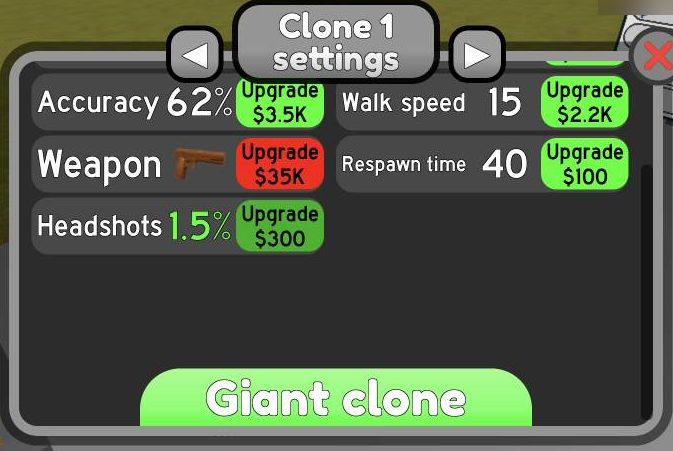
The price goes up after every buy, and fast clicking can empty your cash in seconds. Buy a level or two, then stop. A green button means you can afford it. A red one means you can't. The Giant clone button costs Robux, and Reset clone sits right below it, so watch where you click. For the best upgrade order, see Infinite Tower Tycoon Clone Upgrades Explained.
Step 9: Ride the elevator to your top floor
Your buy pads are spread across floors. The elevator gets you up there, but only if you call it first.
- On floor 1, click the red call button next to the elevator doors. It turns blue.
- Walk inside.
- On the Select floor panel, click Max to pick your highest floor.
- Click Go and wait.
- Walk out onto your floor's buy pads.
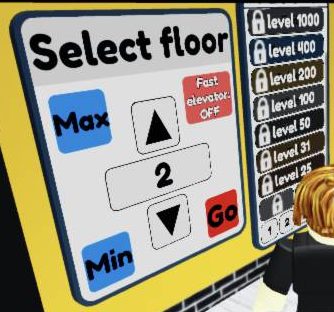
The elevator won't come until you press the call button, and it won't move until you press Go.
How not to waste your cash
- Red pads and buttons mean you can't afford them yet. Don't keep clicking them.
- Save for tycoon pads. Upgrades are tempting, but keep cash for pads like Tycoon lights ($3.25K) and Tower value ($2.75K).
- Save for the clone Weapon upgrade later. It costs $35K, then $100K.
- Check the cash pad after time in menus, because cash keeps piling up there.
- Invite Friends on the sidebar opens a full-screen overlay. Close it with the X at its top left.
For more ways to earn, read How to Get Cash Fast in Infinite Tower Tycoon. For free cash codes, check Infinite Tower Tycoon Codes (October 2026).
Frequently asked questions
How do you collect cash in Infinite Tower Tycoon?
Walk onto the green pad under the Cash sign in your tycoon. Clicking the pad doesn't collect anything, so you have to step on it.
Why is my bat not doing damage?
You either don't have the bat out or you're too far away. Press 1 to equip it, walk right up to the target and face it, then click fast without pausing.
How much cash does Wooden zombie 1 give?
It has 50 HP and pays $560 per kill. It respawns straight away, and 2 kills in a row also give a +$5K bonus.
How often can I spin the free wheel?
About every 3.5 hours. Open it from the top icon on the left sidebar. Prizes are $8K to $80K or a key.
What clone upgrades should I buy first?
Start with Clone HP, Respawn time and Headshots, which cost $100 each at first. Keep Clone mode on Kill and Target on Closest.
How do I stop buying Robux items by accident?
Open Settings with the gear icon at the bottom of the left sidebar. In the Visual section, set Robux button mode to Prompt. After that, the game asks you to confirm before it buys anything.