+1 Stone Skipping gives you free rewards every time you play. There are three kinds: a 7-day Daily Rewards calendar, 12 Playtime Rewards gifts that unlock the longer you stay, and offline training that keeps building Skill after you leave. This guide covers what each one gives, when it unlocks and how to claim it. None of these cost Robux.
The three free rewards at a glance
- Daily Rewards: one reward about every 24 hours, over 7 days. Open it from the calendar icon at the top right.
- Playtime Rewards: 12 gifts that unlock as you play. The longest timer we saw was about 1 hour 45 minutes. Open them from the Gifts button.
- Offline training: you keep earning Skill while logged out. You claim it on the Welcome Back popup when you join.
Try to claim all three every time you play. It's free progress for almost no effort.
How to claim the daily reward
The Daily Rewards calendar often pops up by itself when you join. If it doesn't, you can open it yourself.
- Click the calendar icon at the top right of the screen.
- If today's reward is ready, click CLAIM YOUR REWARD.
- Close the window with the red X.
Once you claim, a timer shows when the next reward is ready. You wait about a day between claims. Just after one claim, the timer read Next reward in: 23:39:03.
All 7 daily rewards
| Day | Reward |
|---|---|
| Day 1 | 1x Skill Boost |
| Day 2 | Fortune Neko (a pet) |
| Day 3 | Win Boost |
| Day 4 | 2x Luck Boost |
| Day 5 | 3x Skill Boost |
| Day 6 | Win Boost |
| Day 7 | Shooting Star Relic (Limited!) |
The big prize is the Shooting Star Relic on Day 7. The calendar marks it as Limited, so it's worth coming back every day to get it. Day 2 also gives you a free pet, the Fortune Neko.
Relics add Skill, just like stones. To see the relics you can buy with Wins, read our +1 Stone Skipping Stones and Relics List (Prices & Skill).
How to claim Playtime Rewards gifts
- Click Gifts in the menu on the left side of the screen. This opens Playtime Rewards.
- Click every Claim button that's ready. Claimed gifts get a check mark.
- Close the window with the X at the top right.
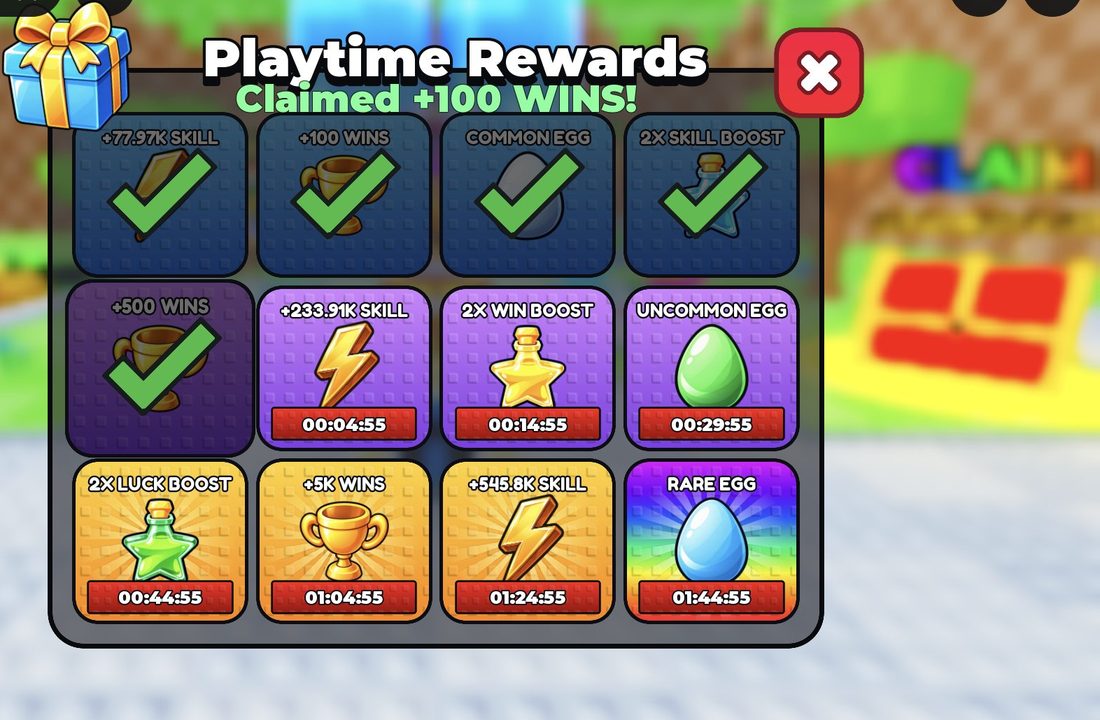
Gifts that aren't ready yet show a countdown timer. They unlock as you keep playing. The longest timer we saw was about 1 hour 45 minutes. Open Gifts again every so often so you don't forget any.
Playtime gifts and their timers
There are 12 gifts in total. In our session, five of them were ready to claim:
- +100 WINS
- +500 WINS
- +77.97K SKILL
- 2X SKILL BOOST
- COMMON EGG
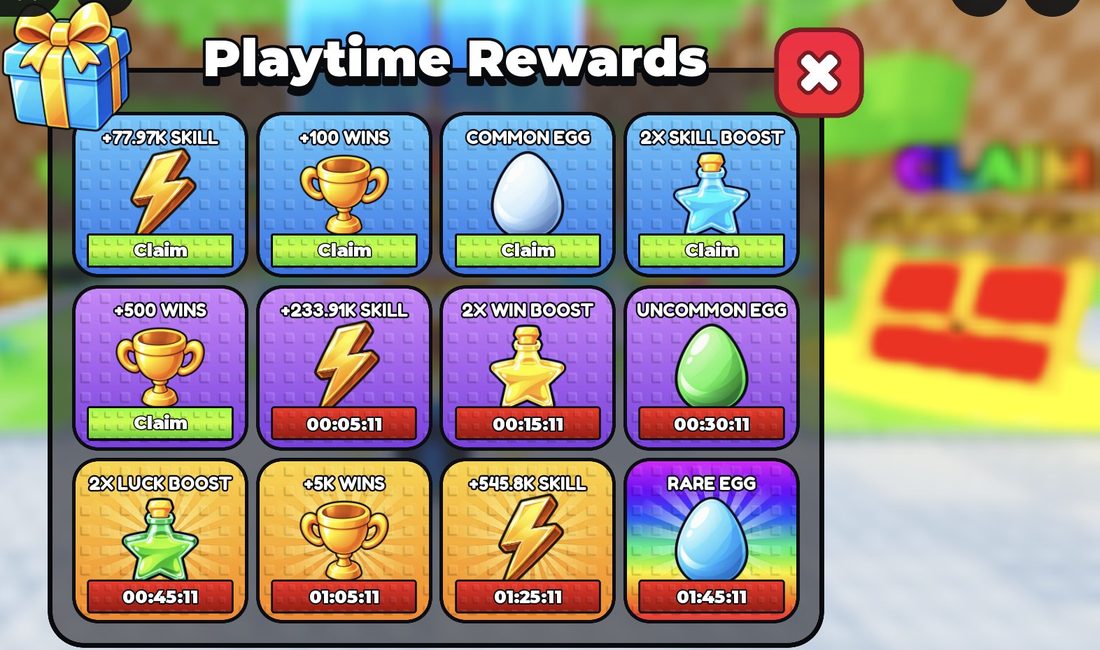
The others were still counting down. These are the timers we saw when we checked:
| Gift | Timer when we checked |
|---|---|
| +233.91K SKILL | about 5 minutes |
| UNCOMMON EGG | about 30 minutes |
| +5K WINS | about 1 hour 5 minutes |
| +545.8K SKILL | about 1 hour 25 minutes |
| RARE EGG | about 1 hour 45 minutes |
The egg gifts are great value. In the egg area, an Uncommon Egg costs 500 Wins and a Rare Egg costs 4K Wins. If you have time, keep playing until the Rare Egg timer runs out so you get it for free.
Offline training and the Welcome Back popup
Your character keeps training even after you log out. When you come back, a Welcome Back popup shows how much Skill you earned while you were away.
- When you join, wait for the Welcome Back popup.
- Click Claim!
- Wait a moment. A message says Offline earnings collected! and the popup closes.

For example, one return gave +42,364 SKILL. The popup also has a rainbow option that triples the reward (to +127,092 in that example), but it costs 9 Robux. The normal Claim! button is free and still gives you all the Skill you earned while away.
A quick routine for every join
- Click Claim! on the Welcome Back popup.
- Claim the Daily Reward from the calendar icon.
- Open Gifts and claim every ready gift.
- Go train and throw. Check Gifts again later for the gifts with longer timers.
New to the game? Our +1 Stone Skipping Beginner's Guide: Train, Throw, Win explains training and throwing. For more ways to level up quickly, see +1 Stone Skipping Tips and Tricks to Progress Faster.
Frequently asked questions
Where are the daily rewards in +1 Stone Skipping?
Click the calendar icon at the top right of the screen. The calendar also often pops up by itself when you join.
What is the Day 7 daily reward?
Day 7 gives the Shooting Star Relic, which the calendar marks as Limited. You get it by claiming a reward every day for 7 days.
How long do you wait between daily rewards?
About a day. A timer in the Daily Rewards window shows how long is left. Just after one claim it read 23:39:03.
How do I get the Playtime Rewards gifts?
Click Gifts in the left-side menu and press Claim on any gift that's ready. There are 12 gifts that unlock as you play, and the longest timer we saw was about 1 hour 45 minutes.
Do you get anything for being offline?
Yes. You keep training while logged out, and you claim the Skill on the Welcome Back popup when you join. The free Claim! button gives you all of it. A 9 Robux rainbow option triples it.
Can you get a free egg in +1 Stone Skipping?
Yes. Playtime Rewards include a Common Egg, an Uncommon Egg and a Rare Egg. When we checked, the Common Egg was ready, the Uncommon Egg had about 30 minutes left and the Rare Egg had about 1 hour 45 minutes left.