Skybase Tycoon is a dropper tycoon by Flappy Bit Games. You build a base on floating islands in the sky. Machines drop blocks onto a conveyor, arches make the blocks worth more, and you spend the money to build an even bigger base. This guide covers your first session step by step, how to earn Cash faster, what to buy first, and the mistakes most new players make.
What is Skybase Tycoon?
Skybase Tycoon is a Roblox tycoon game set on islands floating above a purple void. You start small and build up a base by stepping on build pads.
A few useful things to know:
- Your progress saves automatically.
- Up to 6 players can be in a server.
- Playing with friends gives everyone a bonus: 10% per friend.
- Rebirth lets you start over with a stronger cash boost.
The main currency is Cash, shown in the green counter at the top left. There are also Gems, which some special pads use.
How the core loop works
Everything in the game comes back to one simple loop:
- Droppers drop blocks onto a conveyor. The free Click Dropper drops a $30 block each time you press E.
- Upgraders are coloured arches over the conveyor. Each one raises a block's value as it passes under. Values go up in steps like $30, $45, $75, $120, and later $169 and $270.
- The CASH collector keeps the money your blocks earn. It doesn't go into your wallet until you step on its pad.
- Build pads cost Cash. Step on one to build that part. Each purchase unlocks more pads nearby.
So the loop is: collect your Cash, buy the best pad you can afford, and repeat. Your Rebirth progress also fills up as you build.
Your first session, step by step
1. Deal with the popups
- Click Claim on the Daily Rewards popup, then click Close.
- On the Pick your pet popup, click the pet's picture, not its name. The Koala (x1.05) beats the Cow (x1.02), so it's a good pick.
2. Claim your plot
- From spawn, next to the green CASH board, walk straight ahead across the wooden bridge. If the bridge isn't there yet, step on the free Bridge pad first.
- Step on the green Start Working! FREE pad on the far island.
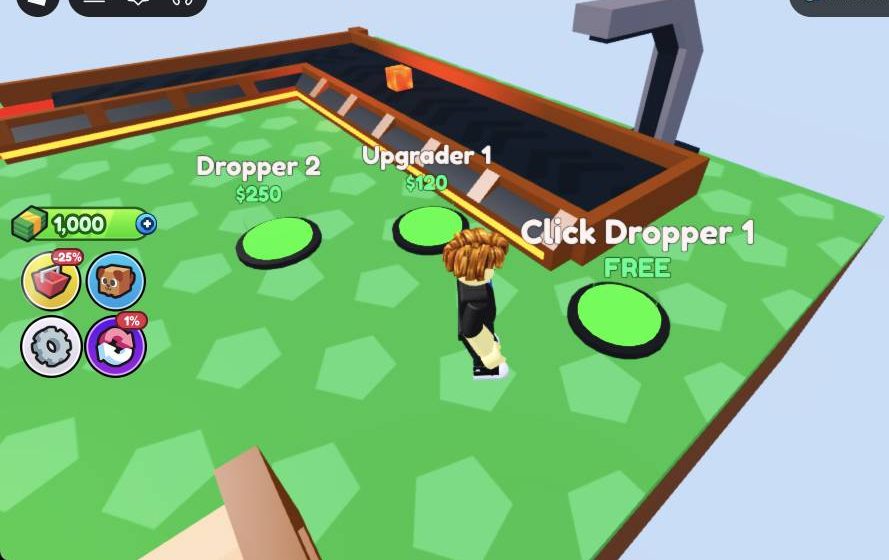
- New pads should appear, including Click Dropper 1 FREE, Upgrader 1 $120 and Dropper 2 $250.
3. Spend your starting 1000 Cash
- Walk onto Click Dropper 1 FREE.
- Walk onto Upgrader 1 $120. A magenta arch appears.
- Walk onto Dropper 2 $250.
- Walk onto Upgrader 2 $500. A blue arch appears, and blocks are now worth about $45.
- You'll have about 130 Cash left. Now save up for Dropper 3 $500 and then Upgrader 3.
4. Make money by hand
- Stand right next to the grey dropper console with the green screen until E Interact shows.
- Press E again and again. Each press drops a $30 block onto the conveyor, and it goes through your upgraders.
5. Collect your Cash
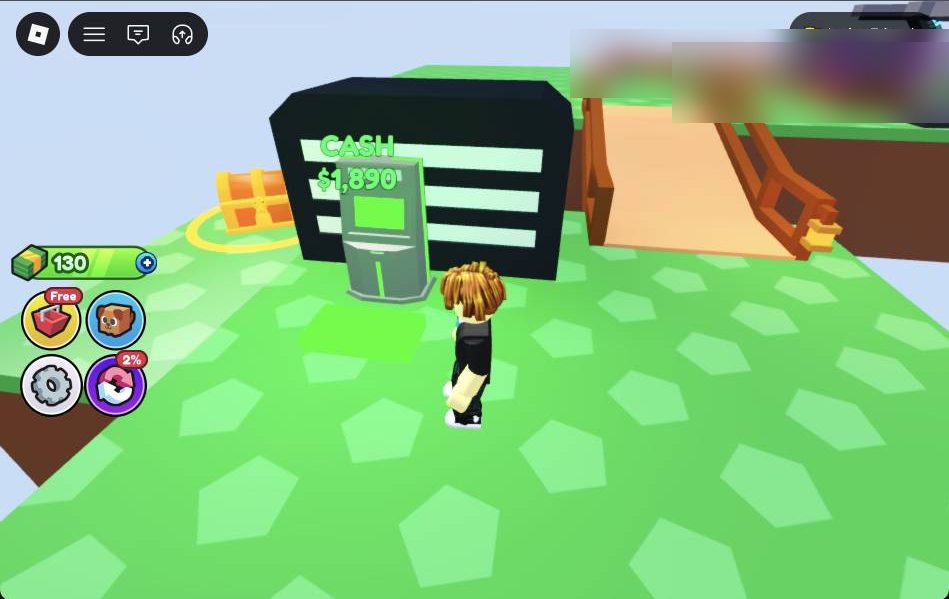
- Walk to the black-and-white CASH collector near the bridge.
- Step on the pad in front of the CASH terminal.
- Check that the CASH display goes back to $0 and your top-left counter goes up.
Then go back, buy the next pad, and keep repeating.
What to buy first
Always buy the pads that make money first. Droppers and upgraders boost every block, so they pay you back the fastest.
Income pads, in rough order:
- Upgrader 1 ($120), Dropper 2 ($250), Upgrader 2 ($500)
- Dropper 3 ($500), Upgrader 3 ($1500)
- Dropper 4 ($2,500)
- Upgrader 4 (it has shown both $4,000 and $14,000, so read the pad)
- Upgrader 5 ($12,900)
- Dropper ($55,000)
Cheap house pads like Path ($50), Floor ($500), Painting ($500), Window ($800 to $950), Lamp ($1,100) and Wall ($2,000) are worth buying too. They unlock more pads. Carpet and Doghouse pads also show up.
After each purchase, look around. New paths often lead to pads that have just unlocked.
After Upgrader 5, you can expect about 7k to 9k Cash every time you collect.
How to earn Cash faster
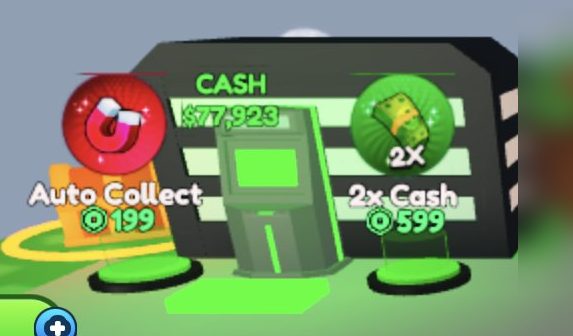
- Collect often. Your money sits in the CASH collector until you step on its pad. It can build up to $77k or more while you're away, so collect it first thing when you join.
- Press E while you wait. Using the Click Dropper by hand adds extra blocks between purchases.
- Upgraders before decorations. One more arch makes every block worth more.
- Play with friends. Each friend in your server gives everyone a 10% bonus.
- Get the Like Chest. It gives +$10,000 for liking the game and joining the group.
- Equip your pet. The Koala gives a x1.05 multiplier. You can equip up to 2 pets in the Pets menu, which also has an AUTO EQUIP BEST button.
- Log in daily. Daily Rewards include Auto Collect (Day 2), a Zombie pet (Day 3), Double Money (Day 4) and a Monkey pet (Day 5).
- Redeem codes. Open Settings (the gear) and type codes into the CODE box. The game's description lists FLAPPY, SEASIDE and CODECASH.
Rebirth explained
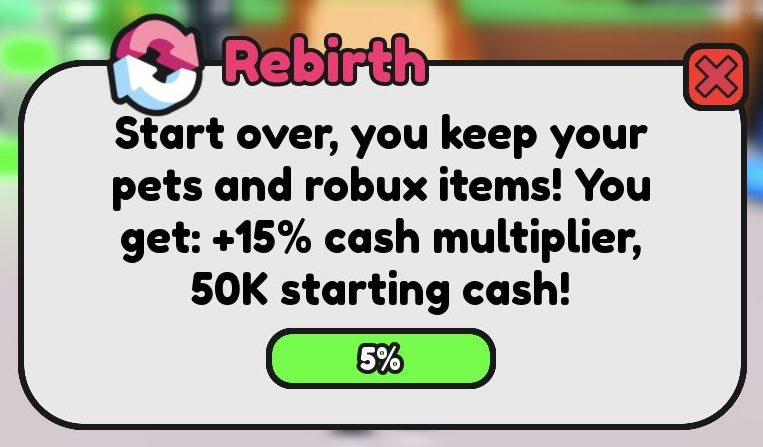
Open the Rebirth menu with the purple % button on the left. Rebirthing starts your base over, but you get:
- +15% cash multiplier
- 50K starting cash
You keep your pets and Robux items. The menu shows a progress bar that fills as you build, so keep buying pads to get closer.
Controls and menus
- Move: your normal Roblox movement controls.
- Buy a pad: walk onto it.
- E: interact. Use it at the Click Dropper console and at the MY CRIB doghouse with your pet.
- Collect Cash: step on the pad at the CASH collector.
Buttons on the left side of the screen:
- Red -25% button: opens the Store.
- Pet button: opens Pets.
- Gear: opens Settings (Music, Low Graphics and the CODE box).
- Purple % button: opens Rebirth.
Close any menu with its X. If you click the Roblox logo at the top left, the game pauses. Click Resume to go back. Close Roblox quits the game.
Common mistakes to avoid
- Stepping on paid pads by accident. Some pads show a Robux, gem or diamond icon instead of $. These include Auto Collect, 2x Cash, Auto Build, Ultimate Rainbow Dropper, End Dragon, Cash 3 and a paid Upgrader 2. They open the Store or use another currency. Only step on pads with a $ price. Watch out, because Auto Collect and 2x Cash sit right next to the CASH collector.
- Mixing up the two Upgrader 2 pads. Buy the one that costs $500 Cash, not the paid one.
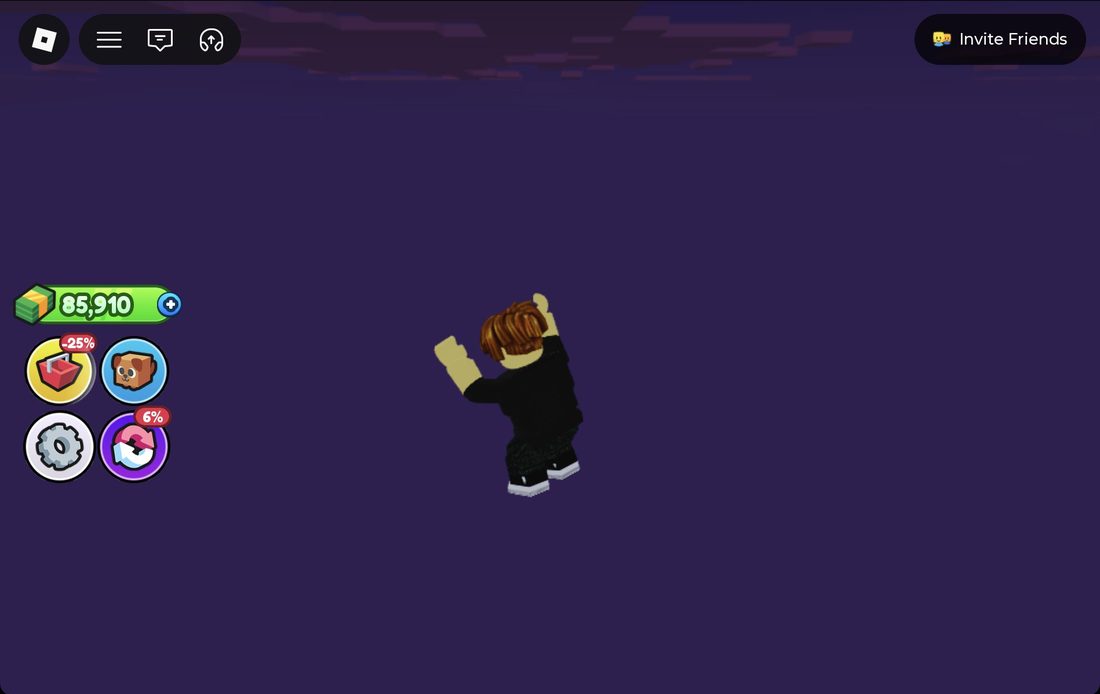
- Falling off the island. It's easy to walk off the edge into the purple void, especially on the way to the CASH collector. Walk in short bursts and check your direction. If you fall, you respawn near the Spawn Portal and CASH area after a few seconds. Look around before you set off again.
- Forgetting to collect. Cash doesn't count until you step on the collector pad.
- Standing too far from the dropper. The E prompt only shows when you're right next to the console.
- Stepping on the wrong pad. Pads are close together. Pink or red pads usually mean you can't afford them or have already bought them. Read the label first.
- Clicking the pet's name. On Pick your pet, click the picture instead.
Frequently asked questions
How do you get money fast in Skybase Tycoon?
Buy droppers and upgraders first, collect from the CASH collector often, and press E at the Click Dropper while you wait. Playing with friends adds 10% per friend, and the Like Chest gives +$10,000.
What are the codes for Skybase Tycoon?
The game's description lists FLAPPY, SEASIDE and CODECASH. Open Settings with the gear button and type them into the CODE box.
What should I buy first in Skybase Tycoon?
Use your starting 1000 Cash on Click Dropper 1 (free), Upgrader 1 ($120), Dropper 2 ($250) and Upgrader 2 ($500). Then save for Dropper 3 and Upgrader 3.
What does Rebirth do in Skybase Tycoon?
Rebirth starts your base over but gives you a +15% cash multiplier and 50K starting cash. You keep your pets and Robux items.
Why isn't my Cash going up?
Your earnings stay in the CASH collector until you step on its pad. Walk over to it and collect, and your top-left counter will go up.
Which starter pet should I pick?
The Koala gives x1.05, which is better than the Cow's x1.02. Click the pet's picture, not its name, to choose it.