In BedWars, everything depends on your bed. While it stands, you respawn every time you die. Once it breaks, one more death and you're out. Every match follows the same plan. Collect iron at your base and spend it on gear and wool. Then bridge out to the middle for diamonds and emeralds, and use them on team upgrades and better gear. Keep your bed safe and break everyone else's. This guide takes you through one whole match in order, then covers the mistakes that most often get new players killed.
How a match works
Each team starts on its own island with a bed, a Team Generator, an Item Shop and an Upgrade Shop. Between the islands is the void. If you fall into it, you die.
The core loop is simple:
- Iron comes from your Team Generator. Spend it in the Item Shop.
- Diamonds and emeralds come from the middle islands. The diamond generator is on one side and the emerald generator is on the other.
- Diamonds pay for team upgrades. Emeralds pay for top-tier armour and swords.
- Protect your bed, break enemy beds, then knock out the enemies who have no bed left.
The kill feed at the top right tells you about kills and broken beds. The top bar shows the timer and which teams are still alive.
Step 1: Join a match
The quickest way in is from the welcome screen after the game loads.
- Click the QUICKPLAY (Classic Squads) card. Don't click TUTORIAL unless you want to learn first.
- A 'Searching for match' banner appears and counts up. Do not click its X. That cancels the search.
- Wait for 'Teleporting to match'.
- On the Map Vote screen, click a map card: Winter Forest, Forest, Dome or Airship.
If you're already in the lobby, click PLAY, then CLASSIC, then choose Squads, Doubles or Solos. Classic Squads has 4 teams of 4 players.
Tip: close any lobby windows first, like Missions, Store or the Starter Pack popup. Then press PLAY.
Step 2: Your first buys in the Item Shop
Stand on your Team Generator for a moment to collect iron. Then walk to the Item Shop NPC.
- Press F to open the Item Shop.
- Check your Iron count at the top right of the shop.
- Click the Leather Armor tile (50 Iron). You'll find it under Combat or Recommended.
- Click the green Purchase button. Clicking a tile only selects it. Nothing is bought until you press Purchase.
- Click the sword tile. Buy the Stone Sword (20 Iron) first, then the Iron Sword (70 Iron) when you can afford it.
- Click White Wool (8 Iron for 16 blocks) and click Purchase. Buy it a few times so you have plenty.
- Close the shop by clicking outside the panel.
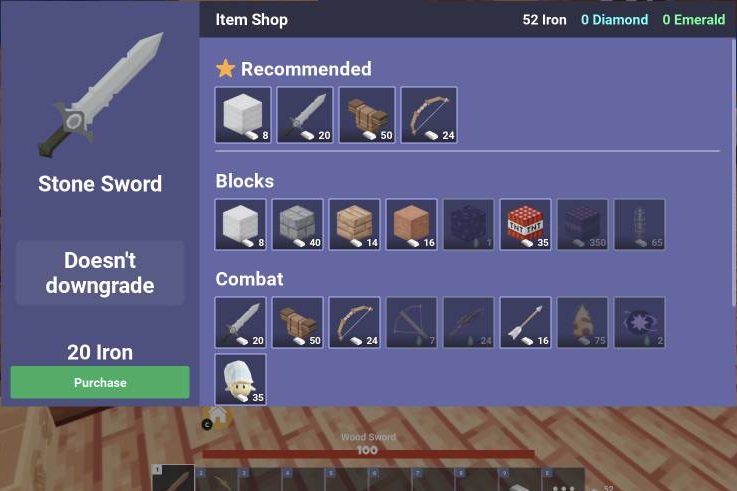
If the button turns red and says 'Not Enough', you can't afford that item yet. Clicking it again won't help, so go and collect more iron. When the tile moves up to the next tier, you can save for Iron Armor (120 Iron).
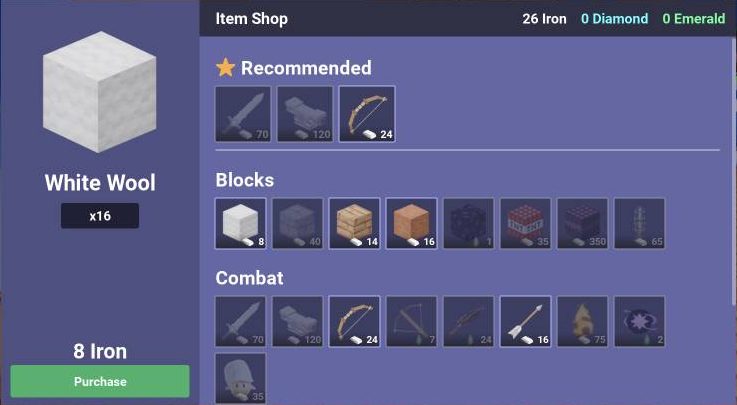
For every price, see our BedWars Item Shop Prices guide.
Step 3: Grab free diamonds at base
Before you leave, check your base for diamonds.
- Walk to the Team Crate at the Team Generator, or to your Personal Chest, until 'F Open' shows.
- Press F.
- Click each item in the Chest grid on the left to move it into your inventory.
- Close the panel.
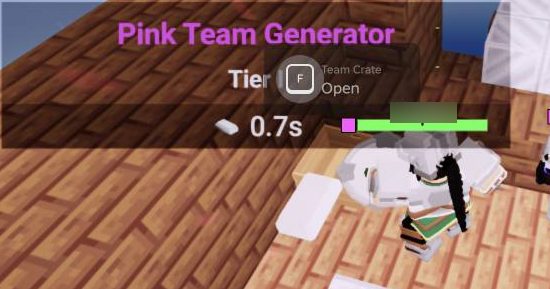
Keep checking the crate during the match. Your team can get diamond rewards sent to the team chest.
Step 4: Buy cheap team upgrades
The Upgrade Shop NPC is next to the Item Shop. Walk up to it and press E to open it. F may also work.
- Find a card you can afford. These first upgrades are cheap: - Bed Alarm: 2 diamonds. It warns you when enemies are near your bed. - Diamond Gen T1: 3 diamonds. - Break Speed T1: 3 diamonds. You break blocks faster. - Team Gen T1: 4 diamonds. Your iron generator gets faster.
- Click UPGRADE under the card.
- Look for a feed message saying the upgrade reached Tier 1.
Upgrades help your whole team. To plan what comes next, read BedWars Team Upgrades: Every Upgrade Shop Tier and What to Buy First.
Step 5: Bridge to the middle
You need wool to cross the void. Your pickaxe is on key 2. Wool is usually on key 3.
- Press the number key for your wool.
- Look down at the edge of the last block you're standing on.
- Click to place a block in front of you, then step forward onto it.
- Keep going until you reach the island. Never walk past your last block.
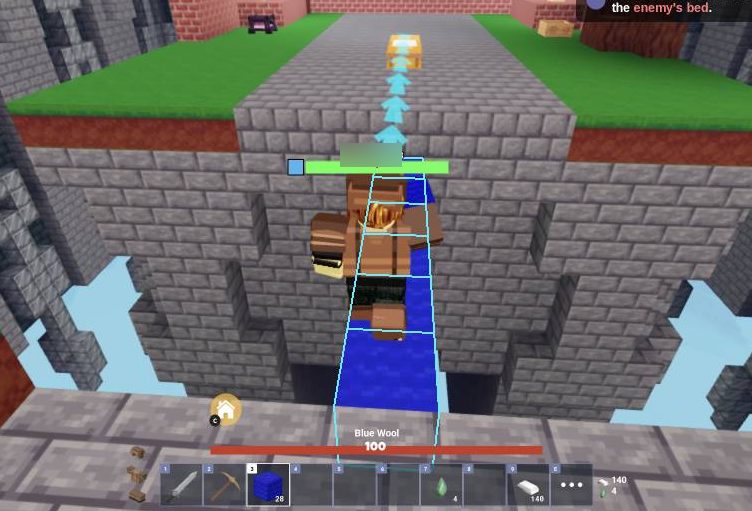
Go for the middle islands to collect diamonds and emeralds. Spend emeralds on big gear upgrades, such as Diamond Sword (4 Emerald) and Diamond Armor (8 Emerald). If you die, these drop one tier. Swords never drop below the one you bought with iron.
Step 6: Fight without falling
- Press 1 to select your sword.
- Keep the enemy's nametag and health bar in the middle of your screen.
- Click steadily, about 5 times a second. Swings have a cooldown, so that pace is enough.
- Red damage numbers mean your hits are landing. Step forward after they get knocked back.
- Watch your health bar above the hotbar. Back off when it gets low.
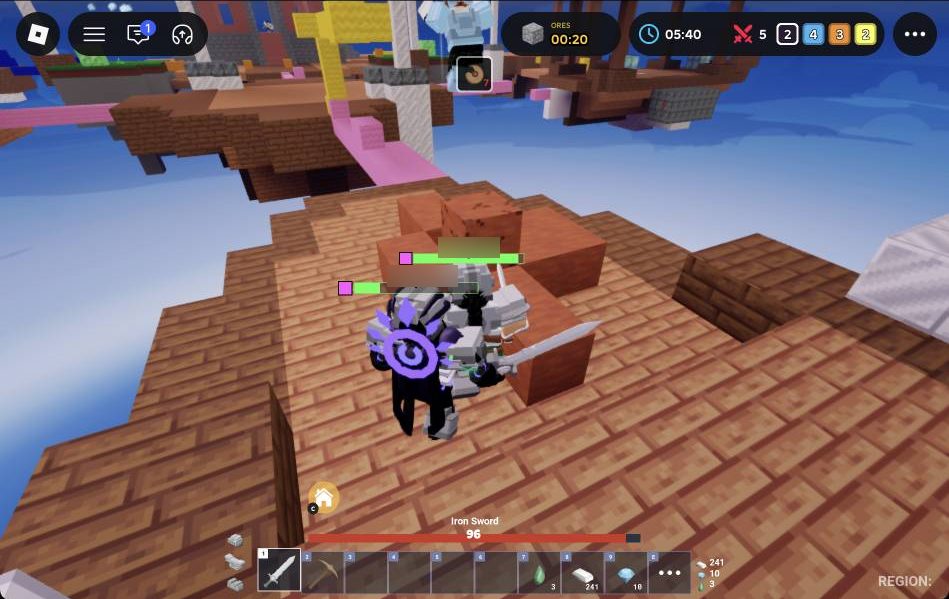
Try to fight in the middle of solid ground. Hits push players back, and that can knock you off the edge.
Step 7: Break an enemy bed
Breaking beds is how you win.
- Bridge over to the enemy island.
- Equip your axe from the hotbar. An axe breaks beds faster than a pickaxe.
- Stand next to the bed and aim at it until it gets a black outline.
- Keep clicking. It takes several hits.
- Check the kill feed for '
Bed' destroyed.
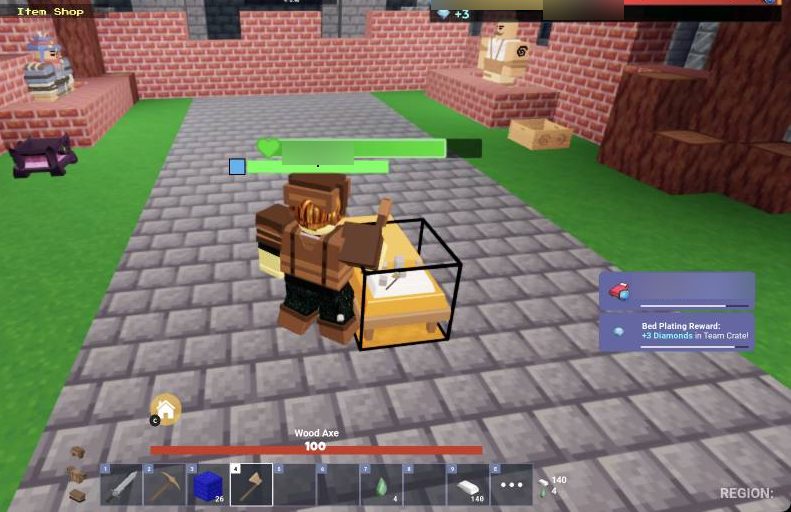
The best time to attack is just after you kill the defenders. A team can't guard its bed while its players are waiting to respawn. When enemies die, pick up the diamonds and emeralds they drop.
Step 8: Recall to base
Walking home over long bridges is slow and risky. Recall instead.
- Move somewhere safe.
- Press C, or click the 'Go to base' button next to the hotbar.
- Wait for the 'Teleporting back to base...' countdown. Don't move and don't get hit.
Recall when your bed is under attack, when you need to shop, or when your health is low.
When your bed is gone
When your bed breaks, you'll see 'YOUR BED WAS DESTROYED - YOU WILL NO LONGER RESPAWN'. From then on, one death and you're out.
- Play carefully and stay away from edges.
- Stick with your teammates.
- Only take fights you're likely to win.
After you're eliminated, click PLAY AGAIN (green) to start a new match, or LOBBY (red) to leave. To leave during a match, click '...' at the top right, then Lobby. To keep your bed safe in the first place, read How to Defend Your Bed in BedWars (Best Blocks & Traps).
Common mistakes that get new players killed
- Clicking a tile and walking away. A tile is only selected until you click the green Purchase button.
- Spamming a red 'Not Enough' button. You need more currency first.
- Fighting on bridges or edges. One knockback can throw you into the void.
- Holding the wrong item. Clicking with the sword places no blocks. Switch to wool to build and to the axe for beds.
- Moving with a menu still open. Close the shop and lobby panels before you walk, fight or press PLAY.
- Cancelling your own search. Leave the X on the 'Searching for match' banner alone.
- Taking risks after losing your bed. One death ends your match.
- Clicking the Roblox logo at the top left. It opens the dialog for closing Roblox.
For more strategy, see BedWars Tips and Tricks to Win More Matches.
Free ways to practise first
Tutorial: In the lobby, click PLAY, then TUTORIAL. Click each dialog box to move it along, and follow the quest tracker and the cyan arrows on the ground. It teaches buying, bridging, recalling and defeating an enemy. When you finish, you get the Scholar title and a Kit Rental Ticket. After that, you can rent a kit or click Choose Later.
Practice: In the lobby, click PLAY, then PRACTICE. You get 999 Iron, Diamond and Emerald, so you can try any item in the shop. Hit the dummies to see your Total Damage and DPS. Press STOP DPS to reset the counter and CHANGE KIT to swap kits.
Frequently asked questions
What should I buy first in BedWars?
Buy Leather Armor (50 Iron), a Stone Sword (20 Iron) and White Wool (8 Iron for 16). Then save up for the Iron Sword (70 Iron) and Iron Armor (120 Iron).
How do I open the shops in BedWars?
Walk up to the Item Shop NPC and press F. The Upgrade Shop is right next to it, and you open it with E. F may also work.
Why can't I buy an item in the Item Shop?
Clicking a tile only selects it, so click the green Purchase button too. If the button is red and says 'Not Enough', you need more currency.
Where do I get diamonds in BedWars?
Check the Team Crate at your generator and your Personal Chest by pressing F. You can also collect diamonds from the generator on the middle islands.
How do I get back to my base quickly?
Press C, or click the 'Go to base' button by the hotbar. Then stay still and don't get hit until the countdown ends.
What happens when my bed is destroyed?
You can't respawn any more, so your next death knocks you out of the match. Play safe and stay with your team.